

Malware Destructor 2009 is another harmful rogue security application that was developed solely for the purpose of gaining money for their worthless program. With its capacity to install itself on computers, Malware Destructor 2009 is not noticeable until it runs its own virus scanner without being executed by the user. Detected threats can only be removed if the software is purchase. If not, victims will suffer from continuous pop-up messages asking for the registration key. Malware Destructor 2009 is a member of a large group of fake anti-virus application that uses the Internet to spread itself. By means of Trojan and fake online virus scanner, this rogue progrm can penetrate a computer without users full knowledge.
Things like Malware Destructor 2009 must be removed from the system using only legitimate anti-malware product. There are free programs that can successfully get rid of Malware Destructor 2009 without spending a single penny. Please see easy removal procedures below to remove Malware Destructor 2009.
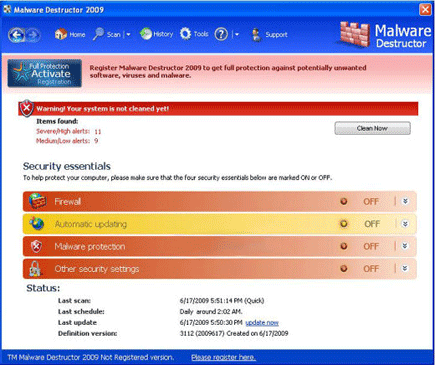
What Malware Destructor 2009 Does?
It will modify Windows Registry and add the following entry/entries:
- HKEY_CLASSES_ROOT\CLSID\{3F2BBC05-40DF-11D2-9455-00104BC936FF}
- HKEY_CLASSES_ROOT\MD345d.DocHostUIHandler
- HKEY_LOCAL_MACHINE\SOFTWARE\Microsoft
- Various entries under HKEY_LOCAL_MACHINE\SOFTWARE\Microsoft\Windows NT\CurrentVersion\Image File Execution Options\
The threat will drop the following malicious file/files:
- %UserProfile%\Application Data\Malware Destructor 2009\cookies.sqlite
- %UserProfile%\Application Data\Malware Destructor 2009\Instructions.ini
- %UserProfile%\Application Data\Microsoft\Internet Explorer\Quick Launch\Malware Destructor 2009.lnk
- %UserProfile%\Desktop\Malware Destructor 2009.lnk
- %UserProfile%\Local Settings\Temp\del.bat
- %UserProfile%\Recent\ANTIGEN.exe
- %UserProfile%\Recent\ANTIGEN.sys
- %UserProfile%\Recent\cb.drv
- %UserProfile%\Recent\energy.exe
- %UserProfile%\Recent\energy.tmp
- %UserProfile%\Recent\FS.sys
- %UserProfile%\Recent\FS.tmp
- %UserProfile%\Recent\FW.dll
- %UserProfile%\Recent\hymt.exe
- %UserProfile%\Recent\kernel32.drv
- %UserProfile%\Recent\PE.dll
- %UserProfile%\Recent\PE.tmp
- %UserProfile%\Recent\tempdoc.exe
- %UserProfile%\Recent\tjd.tmp
- %UserProfile%\Start Menu\Malware Destructor 2009.lnk
- %UserProfile%\Start Menu\Programs\Malware Destructor 2009.lnk
- c:\Documents and Settings\All Users\Application Data\345d567\384.mof
- c:\Documents and Settings\All Users\Application Data\345d567\MD345d.exe
- c:\Documents and Settings\All Users\Application Data\345d567\mozcrt19.dll
- c:\Documents and Settings\All Users\Application Data\345d567\sqlite3.dll
- c:\Documents and Settings\All Users\Application Data\345d567\MDestrSys
- c:\Documents and Settings\All Users\Application Data\345d567\MDestrSys\vd952342.bd
- c:\Documents and Settings\All Users\Application Data\MDestrSys\mdestr.cfg
- c:\WINDOWS\Temp\IMT7.xml
- c:\WINDOWS\Temp\IMT8.xml
- c:\WINDOWS\Temp\IMT9.xml
How to Remove Malware Destructor 2009 Manually
1. Restart your computer in SafeMode
– After turning on the computer, just before Windows start, press F8
– From the selections, Select SafeMode
2. Remove Registry entries that the threat added. You MUST BACKUP YOUR REGISTRY FIRST.
– Click Start > Run
– Type in the field, regedit
– Navigate and look for the registry entries mentioned above and delete if necessary
3. Delete malicious files that the threat added:
– Based on the given location above, browse and delete malicious file.
– If no location is given, click Start>Search> and search for the file.
– If cannot be deleted, press Ctrl+Alt+Del to access Task Manager, see if the file is running in the process. If it is, select the file and click End Process. Perform file delete again.
