

Contraviro is a fake spyware and malware remover that was said to be patterned through Unvirex rogue programs. This application implies scary tactics such as fake alert messages and false scan results in an attempt to persuade users into purchasing the full version of the program. Contraviro usually infects computers if they visited a website equipped with malevolent scripts. The script can download and install a copy of Contraviro onto victims computer without their consent.
Most of the time Contraviro is being advertised through the use of fake multi-media player from malicious web sites that initially prompt visitor to download the codec to be able to view online video. Aside from that, fake online virus scanner is utilized to load Contraviro on to victims computer. Once inside, its main objective is to push users to pay for the licensed version of the program.
What Contraviro Does?
It will launched its own virus scanner every time Windows is started.
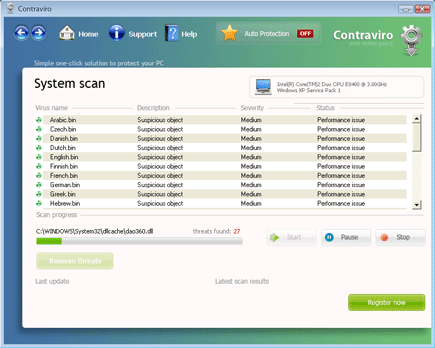
It will modify Windows Registry and add the following entries:
- HKEY_CLASSES_ROOT\*\shellex\ContextMenuHandlers\antivirus_contextscan
- HKEY_CLASSES_ROOT\AppID\{C0E56AC2-9F72-436E-B6E7-AEC28AF9E4EB}
- HKEY_CLASSES_ROOT\AppID\IEAddon.DLL
- HKEY_CLASSES_ROOT\CLSID\{08EEC6AD-7486-487F-89B7-5A3716DDAE14}
- HKEY_CLASSES_ROOT\CLSID\{CCB5551D-8594-4999-85F9-1E3EABCB95AC}
- HKEY_CLASSES_ROOT\Drive\shellex\ContextMenuHandlers\antivirus_contextscan
- HKEY_CLASSES_ROOT\Drives\shellex\ContextMenuHandlers\antivirus_contextscan
- HKEY_CLASSES_ROOT\Folder\shellex\ContextMenuHandlers\antivirus_contextscan
- HKEY_CLASSES_ROOT\Interface\{5B184B9D-B7BD-4FEA-8D1F-5E27182206A5}
- HKEY_CLASSES_ROOT\TypeLib\{3ED0E410-5C8E-47B6-A75D-D10B886E903C}
- HKEY_LOCAL_MACHINE\SOFTWARE\Contraviro
- HKEY_LOCAL_MACHINE\SOFTWARE\Microsoft\Windows\Current Version\Explorer\Browser Helper Objects\{CCB5551D-8594-4999-85F9-1E3EABCB95AC}
- HKEY_LOCAL_MACHINE\SOFTWARE\Microsoft\Windows\Current Version\Uninstall\Contraviro
- HKEY_CURRENT_USER\Software\Microsoft\Windows NT\Current Version\Winlogon “Shell”
- HKEY_LOCAL_MACHINE\SOFTWARE\Microsoft\Windows\Current Version\Internet Settings\User Agent\Post Platform “Contraviro”
- HKEY_LOCAL_MACHINE\SOFTWARE\Microsoft\Windows\Current Version\Run “Contraviro”
The threat will drop the following malicious files:
- c:\Program Files\Contraviro\Contraviro.exe
- c:\Program Files\Contraviro\daily.cvd
- c:\Program Files\Contraviro\Drvfltip.sys
- c:\Program Files\Contraviro\hjengine.dll
- c:\Program Files\Contraviro\IEAddon.dll
- c:\Program Files\Contraviro\main.cvd
- c:\Program Files\Contraviro\MFC71.dll
- c:\Program Files\Contraviro\MFC71ENU.DLL
- c:\Program Files\Contraviro\msvcp71.dll
- c:\Program Files\Contraviro\msvcr71.dll
- c:\Program Files\Contraviro\pthreadVC2.dll
- c:\Program Files\Contraviro\shellext.dll
- c:\Program Files\Contraviro\siglsp.dll
- c:\Program Files\Contraviro\uninstall.exe
- c:\Documents and Settings\All Users\Start Menu\Programs\Contraviro
- c:\Documents and Settings\All Users\Desktop\Contraviro.lnk
- c:\Documents and Settings\All Users\Start Menu\Programs\Contraviro.lnk
- c:\Documents and Settings\All Users\Start Menu\Programs\Contraviro\Contraviro.lnk
- c:\Documents and Settings\All Users\Start Menu\Programs\Contraviro\How to Register Contraviro.lnk
- c:\Documents and Settings\All Users\Start Menu\Programs\Contraviro\Register Contraviro.lnk
- %UserProfile%\Application Data\Microsoft\Internet Explorer\Quick Launch\Contraviro.lnk
How to Remove Contraviro Manually
1. Restart your computer in SafeMode
– After turning on the computer, just before Windows start, press F8
– From the selections, Select SafeMode
2. Remove Registry entries that the threat added. You MUST BACKUP YOUR REGISTRY FIRST.
– Click Start > Run
– Type in the field, regedit
– Navigate and look for the registry entries mentioned above and delete if necessary
3. Delete malicious files that the threat added:
– Base on the given location above, browse and delete the malicious file.
– If no location is given, click Start>Search> and search for the file.
– If cannot be deleted, press Ctrl+Alt+Del to access Task Manager, see if the file is running in the process. If it is, select the file and click End Process. Perform file delete again.
