

SafetyKeeper is another rogue program from the same company that previously released SaveKeeper, SystemCop, QuickHealCleaner and MalwaresEradicator. Having the same functionalities of misleading computer users, these programs also share the same goal and that is to earn from this unwanted program with the use of fictitious promotional scheme. SafetyKeeper can be dropped on to computer by a Trojan that can be acquired by visiting a malicious websites. Once on the system, it will do nothing but to perform it own virus scan that leads to trick computer users about the true security status of the computer. To reinforce this opinion it will regularly pop-up warning messages on the presence of malware and a removal must be accomplish immediately.
What are the Symptoms of this Rogue Program Infection?
A virus scan will be performed on infected computer.
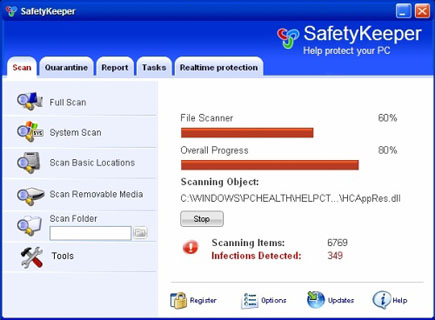
SafetyKeeper will modify Windows Registry and add the following entries:
- HKEY_CURRENT_USER\Software\SafetyKeeper
- HKEY_LOCAL_MACHINE\SOFTWARE\Microsoft\Windows\Current Version\Uninstall\SafetyKeeper
- HKEY_LOCAL_MACHINE\SOFTWARE\SafetyKeeper
- HKEY_LOCAL_MACHINE\SYSTEM\CurrentControlSet\Enum\ Root\LEGACY_SAFETYKEEPERSVC
- HKEY_LOCAL_MACHINE\SYSTEM\CurrentControlSet\Services\SafetyKeeperSvc
- HKEY_CURRENT_USER\Software\Microsoft\Windows\CurrentVersion\Run "gbn976rl.exe"
- HKEY_CURRENT_USER\Software\Microsoft\Windows\CurrentVersion\Run "SafetyKeeper"
The threat will drop the following malicious files and folders:
- c:\Program Files\SafetyKeeper Software
- c:\Program Files\SafetyKeeper Software\SafetyKeeper
- c:\Program Files\SafetyKeeper Software\SafetyKeeper\SafetyKeeper.exe
- c:\Program Files\SafetyKeeper Software\SafetyKeeper\uninstall.exe
- c:\Documents and Settings\All Users\Desktop\SafetyKeeper.lnk
- c:\Documents and Settings\All Users\Start Menu\Programs\SafetyKeeper
- c:\Documents and Settings\All Users\Start Menu\Programs\SafetyKeeper\1 SafetyKeeper.lnk
- c:\Documents and Settings\All Users\Start Menu\Programs\SafetyKeeper\2 Homepage.lnk
- c:\Documents and Settings\All Users\Start Menu\Programs\SafetyKeeper\3 Uninstall.lnk
- c:\WINDOWS\1059ztr9j470.bin
- c:\WINDOWS\1155backdoor929z.ocx
- c:\WINDOWS\118019ot-a-virus5ez.exe
- C:\Windows\System32\gbn976rl.exe
- c:\WINDOWS\system32\90a3t5ief225z.ocx
- c:\WINDOWS\system32\9207znot-a-v5rus2f7.bin
- c:\WINDOWS\system32\923bspyw5rez493.exe
- c:\WINDOWS\system32\925855ot-a-virus31z.exe
- c:\Documents and Settings\Bleeping\Local Settings\Temp\gbn976rl.exe
How to Remove SafetyKeeper Manually
1. Restart your computer in SafeMode
– After Power-On the computer, just before Windows start, press F8
– From the selections, Select SafeMode
2. Remove Registry entries that the threat added. You MUST BACKUP YOUR REGISTRY FIRST.
– Click Start > Run
– Type in the field, regedit
– Navigate and look for the registry entries mentioned above and delete if necessary
3. Delete malicious file/files that the threat added:
– Base on the given location above, browse and delete the file
– If no location is given, click Start>Search> and search for the file.
– If cannot be deleted, press Ctrl+Alt+Del to access Task Manager, see if the file is running in the process. If it is, select the file and click End Process. Perform file delete again.
4. Scan computer with Antivirus Program
– Update antivirus program
– Scan computer and delete all detected threats.
